
How Long Does a PowerPlay Withdrawal Take?

Fact Checked By:
Cody Aceveda
Last Updated:

PowerPlay withdrawal time is typically within four hours during office hours, but it can take up to 24 hours. After PowerPlay approves the request, the total wait time depends on the withdrawal method and how quickly the payment provider completes the transfer. Some methods can deliver funds quickly after approval, while others may take longer to reach your account.

PowerPlay Withdrawal Times

100% Match Bonus Up To C$500
Claim Your Bonus

PowerPlay Withdrawal Times at a Glance

PowerPlay aims to process withdrawal requests within four hours during office hours, although the total payout time depends on the method you use. Withdrawal speed is one of the first things bettors look at in any PowerPlay review, and the table below breaks it down by method.

Withdrawal MethodWithdrawal TimeMin. WithdrawalMax WithdrawalFees

Interac

Interac e-Transfer

Instant after PowerPlay completes the payout

$10

Up to $3,000 total within 24 hours

First withdrawal free. After that, free over $100, 3% fee under $100

Visa

Visa/MasterCard

Instant after PowerPlay completes the payout

$10

Up to $9,999 total within 24 hours

First withdrawal free. After that, free over $100, 3% fee under $100

Muchbetter

MuchBetter

3-5 business days after PowerPLay completes the payout

$10

Up to $3,000 total within 24 hours

First withdrawal free. After that, free over $100, 3% fee under $100

crypto

Crypto

Within 60 minites after PowerPlay completes the payout

$10

Up to $5,000 total within 4 fours

First withdrawal free. After that, free over $100, 3% fee under $100

PowerPlay processes withdrawals within four hours during busy periods, with a maximum processing time of 24 hours. Withdrawals are handled from 8:00 a.m. to 5:00 p.m. ET on weekdays and 12:00 p.m. to 4:00 p.m. ET on weekends. Note that some payment service partners do not process payouts during weekends.

You must verify your identity before your first withdrawal. PowerPlay requires valid photo identification, proof of address dated within the previous three months, and an accompanying selfie to show that it’s you.
How to Request a Withdrawal on PowerPlay: Step by Step

Here’s what you need to do to request a withdrawal on PowerPlay:

bt10-ca-powerplay-step-1-400x710

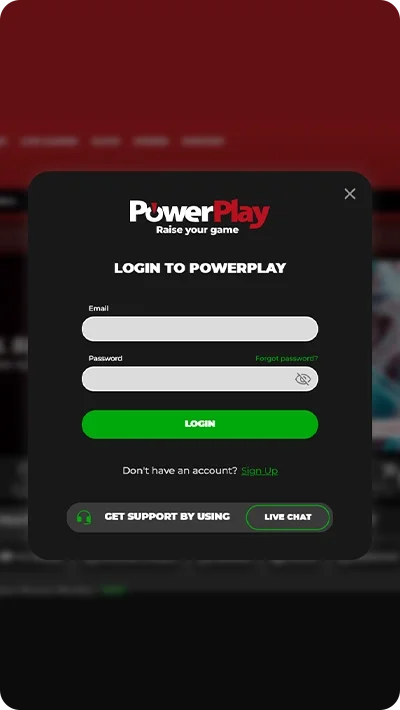
Step 1: Log in to your PowerPlay account

Go to PowerPlay and select Login to access your account. You must have made at least one deposit before requesting a withdrawal. New customers can register through the website first. PowerPlay also offers a mobile app in Canada, allowing players to participate on their handheld device.

bt10-ca-powerplay-step-2-400x710

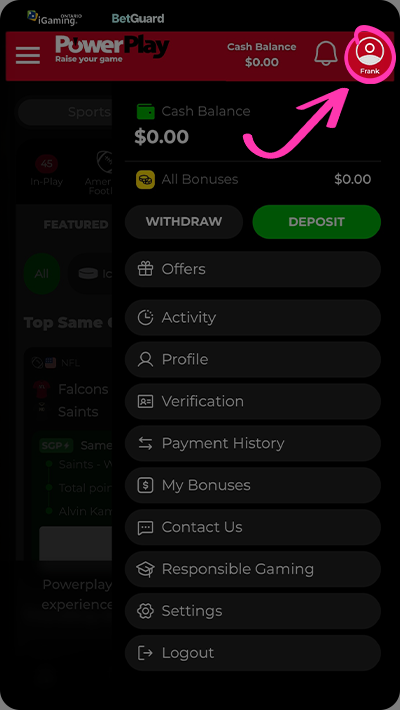
Step 2: Open your account menu and go to the Cashier

Once you’re logged in, click your account information at the top-right of your screen. It has a person icon, so it’s easily noticeable. You’ll find it to the right of your “Cash Balance.”

bt10-ca-powerplay-step-3-400x710

Step 3: Select Withdraw

Select “Withdraw” to remove funds from your account. For your first withdrawal, you will need to make sure that you have verified your identity by providing a piece of government-issued ID along with an accompanying selfie.

bt10-ca-powerplay-step-4-400x710

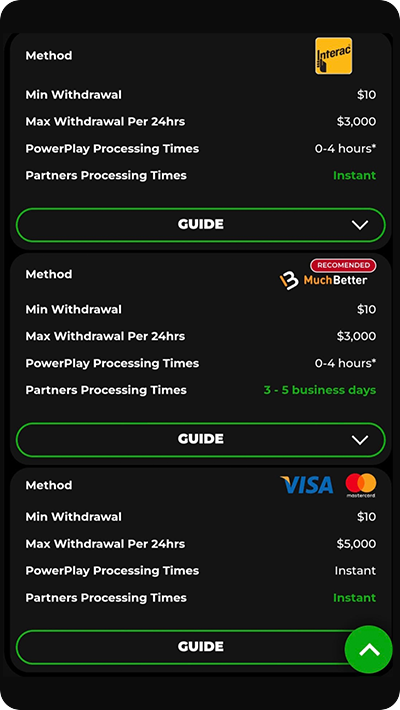
Step 4: Choose Your Withdrawal Method

This will pull up the available banking methods, including Interac e-Transfer, Visa/Mastercard, crypto, and MuchBetter.

bt10-ca-powerplay-step-5-400x710

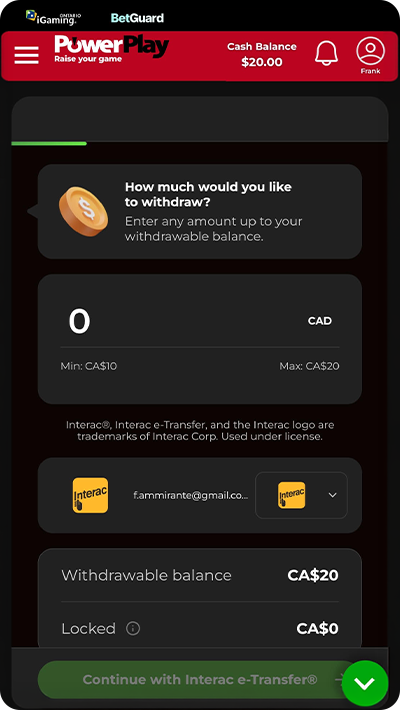
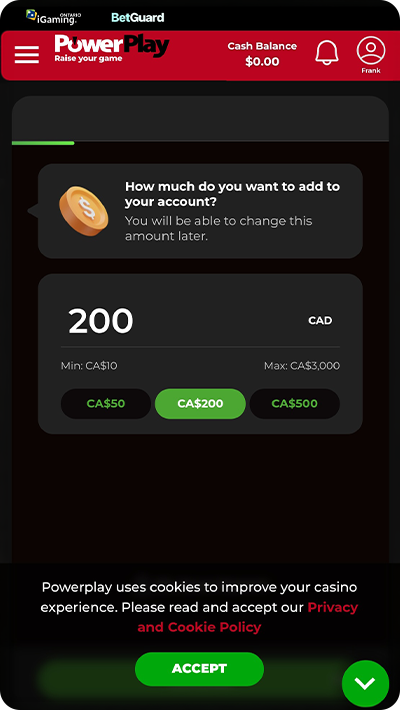
Step 5: Enter the amount and submit

Enter the amount you want to withdraw and submit the request using your chosen payout method. There is a $10 minimum withdrawal, while the maximum depends on the payment method. Your withdrawal method needs to have been used previously for a deposit.

Step 6: Wait for confirmation and track the status

After submission, PowerPlay reviews the withdrawal before completing the payout. The withdrawal may appear as “Authorized,” meaning it has been submitted and is being reviewed. Other confirmed status labels are “Cancelled,” “Completed,” and “Declined.” PowerPlay also allows eligible pending withdrawals to be cancelled before completion, while completed withdrawals cannot be recalled or cancelled.

100% Match Bonus Up To C$500
Claim Your Bonus

Tips Before You Withdraw at PowerPlay

Withdrawal limits, fees and timing vary widely, and online sportsbook reviews tend to flag them up front. Before you request a payout at PowerPlay, check the requirements tied to your account.

check-smallComplete identity verification before you need it : PowerPlay requires verification before your first withdrawal. You need valid photo identification and proof of address dated within the previous three months, along with an accompanying selfie. Completing this early can prevent your first payout from being held up. Get it out of the way immediately after registration.

check-smallKnow your method’s limits and timing: Withdrawal limits and processing times vary by payment method, as shown in the table above. Check the option available in your account before submitting, since methods such as Interac can have different limits and processing times from other payout options.

check-smallCheck for active bonuses before withdrawing: Review any active sportsbook bonuses in Canada before requesting a payout. At PowerPlay, you cannot withdraw funds from your cash balance while a bonus is active. Check the offer’s wagering requirements and complete them before submitting your withdrawal.

Why Is My PowerPlay Withdrawal Taking So Long?

Below are some reasons why your PowerPlay withdrawal could be delayed.

1. Your request was submitted outside office hours

PowerPlay processes withdrawals during set office hours: 8:00 a.m. to 5:00 p.m. ET on weekdays and 12:00 p.m. to 4:00 p.m. ET on weekends. Requests submitted outside those windows may take longer to begin processing. PowerPlay aims to process withdrawals within four hours during busy periods, with a maximum of 24 hours.

2. This is your first withdrawal

First-time withdrawals require account verification. That takes some time to process. Your withdrawal may also be delayed if the image you provide is blurry or if the information is outdated. Make sure your government-issued ID (ex. driver’s license) and proof of address (ex. utility bill) are up to date.

3. Wagering requirements have not been met

An active bonus can prevent a withdrawal from being processed. PowerPlay requires you to satisfy the offer’s wagering requirements before withdrawing bonuses. Cash funds cannot be withdrawn while a bonus is active. Check My Account, then Rewards, then Bonuses to track your remaining wagering requirement.

Withdrawal has not arrived after the expected window

Delivery time after PowerPlay approves your payout depends on the payment method and financial institution. If it is overdue, confirm that your payment details are correct and check the payout information for your method. PowerPlay customer support is available 24/7 through live chat or by email at support@powerplay.com. You can contact them for further assistance.

Frequently Asked Questions: PowerPlay Withdrawal Time Canada

  • Can I withdraw to a different payment method than the one I used to deposit?

    Yes, but you must first make a deposit using the new payout method before it becomes available for withdrawals. Withdrawals are typically refunded to a payment method previously used to deposit.

  • Can I cancel my PowerPlay withdrawal after submitting it?

    Yes, as long as PowerPlay has not completed the withdrawal. Click your account information, where pending transactions appear at the top, and select the cancellation option. If you cannot see it, contact customer support. Once PowerPlay marks a withdrawal as completed, it cannot be cancelled.

  • How do I check the status of my PowerPlay withdrawal?

    PowerPlay displays pending transactions in your account information, where withdrawals can also be cancelled. Its confirmed withdrawal status labels are “Authorized,” “Cancelled,” “Completed,” and “Declined.” An Authorized withdrawal has been submitted and is still being reviewed and approved.

  • Does PowerPlay have a daily withdrawal limit?

    Yes. PowerPlay’s general limit is $3,000 per transaction for Interac eTransfer and MuchBetter. But for crypto, it’s $5,000. Visa/Mastercard withdrawals can be as large as $9.999.

  • What happens to my PowerPlay withdrawal if my account is not verified?

    You cannot complete your first withdrawal until PowerPlay verifies your account. The process requires valid picture identification, proof of address dated within the previous three months, and a selfie through its automated verification system. Once verification is successfully completed, you can submit the withdrawal request.

  • Can I make a withdrawal if I have an active bonus on my PowerPlay account?

    No. PowerPlay says you must meet the wagering requirements attached to an active bonus before a withdrawal can be completed. It also states that funds in your cash balance cannot be withdrawn while a bonus is active. Check My Account -> Rewards -> Bonuses to review your progress and the offer terms.

More Sportsbook Withdrawal Guides for Canada

Looking at other options? These guides cover withdrawal times at more sportsbooks in Canada.

Frank is a sports content creator who writes fantasy sports, sports betting, sportsbook reviews, and industry news articles for a number of websites. You may have seen his work at Deadspin, RotoBaller, FantasyPros, and much more. When he’s not writing or watching sports, Frank is planning his next trip or checking out a new restaurant to try.